In last blog, Add BitLocker Encryption Information in Report – (binlabs.in), we talked about how to get custom information from a client machine to Log Analytics using PowerShell script.
Assuming that you people tried using it, now let’s try to build a dashboard using this data in Power BI.
Before we proceed further, lets first understand more about Power BI.
Power BI is a business analytics service by Microsoft that provides interactive visualizations and business intelligence capabilities with an interface simple enough for end users to create their own reports and dashboards. With Power BI, you can connect to a wide variety of data sources, from simple Excel spreadsheets to on-premises SQL Server Analysis Services and cloud-based data sources like Azure SQL Database, Salesforce, and more.
Power BI has several advantages over other reporting tools. It is easy to set up and learn, and it can connect to hundreds of data sources, both on-premises and in the cloud. It also allows you to share and collaborate on reports and real-time dashboards, all infused with AI Power BI makes it very simple to derive insights from transactional and observational data and then get those insights into the hands of every employee to support decision making.
Now lets talk about how to import data from Log Analytics to to Power BI. There are many ways of importing data to Power BI. However, here are going to use M query.
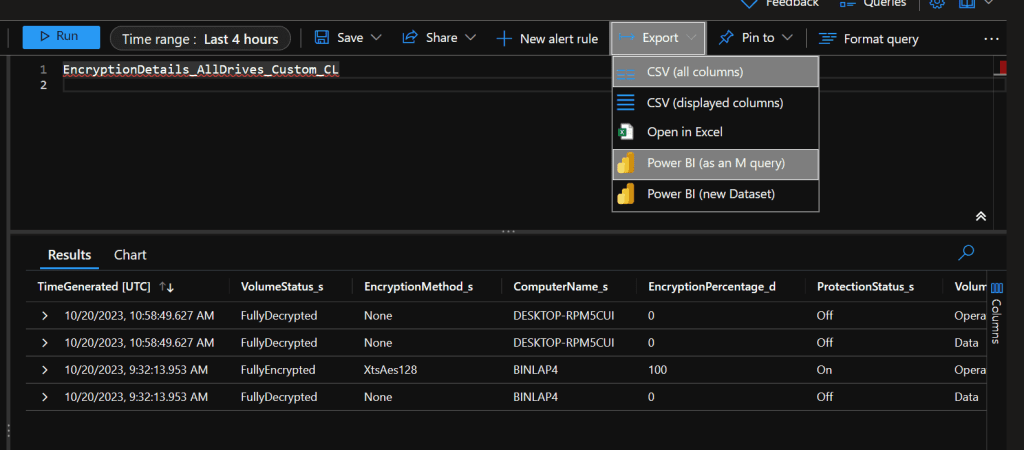
All we need is Log in to Log Analytics Workspace. Run the query manually after selecting the appropriate time range. Select Export option and then select Power BI (as an M query). It will download a txt file. Open Power BI Desktop and select ‘Get Data’ -> ‘Blank Query’ -> ‘Advanced Query Editor’. Paste the M Language script into the Advanced Query Editor and select ‘Done’.
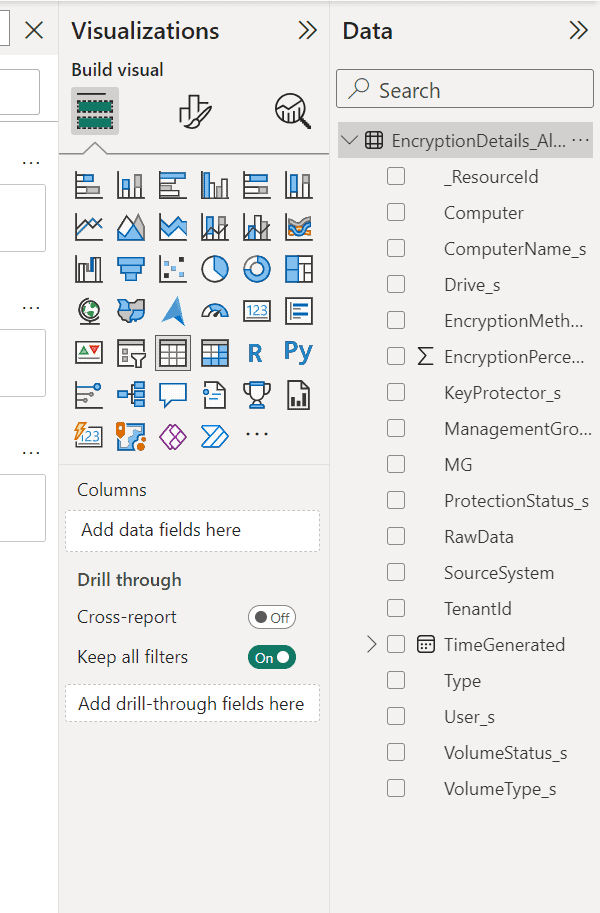
Once done the query should be visible under data section.
Just ensure to rename the Query1 to your desired name.
Once done, you can play around with this under Pie Chart or Table or any other Graphical Presentation.
Hope this helps 🙂

 Binlabs
Leave a comment